Distributed Processing with Oracle Data Transforms

Introduction
In this post I explore how Oracle Data Transforms, a data integration and ETL service available in Oracle Cloud Infrastructure, optimizes processing in distributed environments.
Why is that important?
Data integration tools must often deal with distributed data and complex topologies. Data sources, data targets, and processing engines may be deployed across geographies, data centers, and cloud regions. Transferring, integrating, and processing geographically distributed data has not only significant impact on performance and latency, but it could also increase egress costs in commercial clouds.
Data Transforms uses several methods that make the service well suited for data integration and processing in distributed environments. I believe these methods are the best practices that work really well in majority of cases.
Read below how Data Transforms pushes processing to source and target databases and how it batches data transfer for higher throughput.
Oracle Data Transforms
Oracle Data Transforms is a low-code data integration and batch transformation service available in Oracle Cloud Infrastructure (OCI). It lets users move, cleanse, and transform data using a visual drag-and-drop interface instead of writing code.
Data Transforms is based on the ELT (Extract, Load, Transform) architecture, with source and target databases providing the SQL based transformation engine, and Data Transforms managing the connectors, data pipeline design, orchestration, scheduling, metadata, and monitoring.
Under the hood, Data Transforms uses Oracle Data Integrator (ODI) for code generation, execution, and orchestration. However, the ODI features enabling this, such as Knowledge Modules, Logical and Physical Schemas, Contexts, and Agents are not exposed to Data Transforms users.
Data Transforms may be deployed as a fully managed service that is part of the Oracle Autonomous AI Database or as a deployment of OCI GoldenGate. It may be also deployed from OCI Marketplace on a customer managed OCI Compute, with Autonomous AI Database as metadata repository.
For more information please refer to Data Transforms documentation.
Optimization Methods
How can you optimize the performance of data integration and processing pipelines in a distributed environment and reduce the egress costs?
-
Reduce the size of transferred data. Transfer only the required rows and columns, use space efficient data formats and encodings, compress data.
-
Batch data. Improve the data transfer performance by batching data into larger data sets. This reduces network overhead and improves compression and data apply efficiency.
-
Parallelize data transfer. Transfer data in parallel to fully utilize the capacity of the network link. Use dedicated link for high volume data transfer.
-
Push processing to sources. Reduce the data size by pushing the processing to sources. Column projection, row filtering, local joins and local aggregations are candidates for pushdown to sources.
-
Push processing to target. Eliminate distributed joins and transformations by transferring the required data to the target and join them locally on the target.
-
Reuse local copy of data. If a single source data set is used in multiple data flows, transfer and materialize it once and reuse the copy by every data flow.
Test Configuration
Test environment consists of 4 Autonomous AI Databases, deployed across multiple Oracle Cloud regions and connected over OCI backbone.
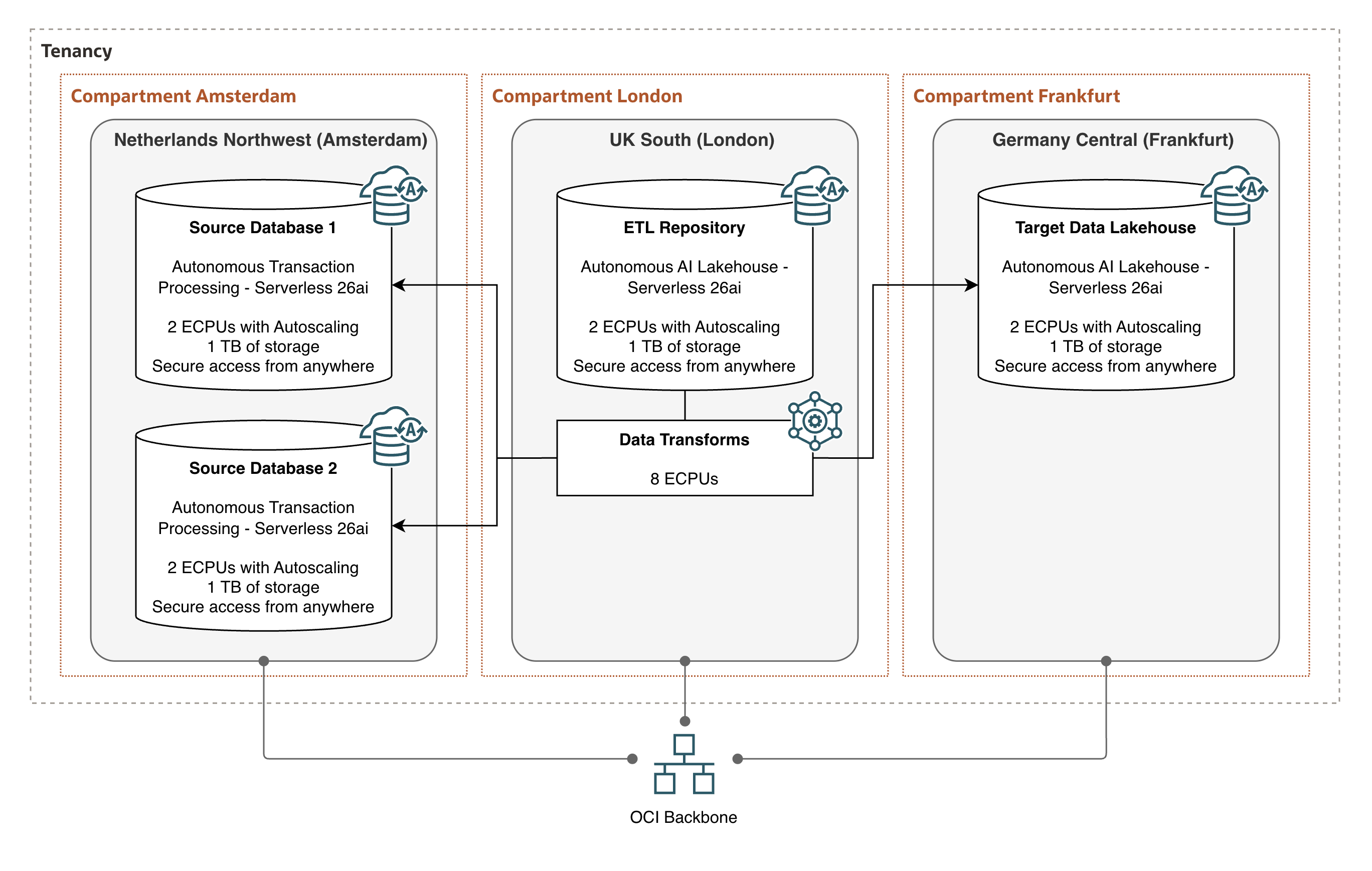
- 3 regions - Netherlands Northwest (Amsterdam), UK South (London), and Germany Central (Frankfurt).
- 2 source databases deployed in the Netherlands Northwest (Amsterdam).
- Target data lakehouse database deployed in the Germany Central (Frankfurt).
- Data Transforms with ETL repository deployed in the UK South (London).
- Autonomous Transaction Processing 26ai (ATP) used for the source databases.
- Autonomous AI Lakehouse 26ai (AILH) used for the target data lakehouse and the ETL repository.
- All database instances provisioned with minimum resources (2 ECPUs) and autoscaling.
- All database instances provisioned with “Secure access from anywhere” for simplicity.
- Data Transforms configured with the minimum resources (8 ECPUs).
- All connections to database instances created with MEDIUM service.
- Connectivity between instances via public access (Internet), using OCI backbone.
Test Data
All test data in Source Databases 1 and 2 is articially generated. Data in the Target Data Lakehouse is populated from the Source Databases 1 and 2, using the test scenarios described below.
| Database | Table | Rows | Data Size (MB) | Allocated Size (MB) |
|---|---|---|---|---|
| Source Database 1 | SOURCE1_MASTER_TABLE | 262770 | 40 | 19 |
| Source Database 1 | SOURCE1_DETAIL_TABLE | 26277000 | 11956 | 14518 |
| Source Database 2 | SOURCE2_MASTER_TABLE | 262770 | 40 | 19 |
| Source Database 2 | SOURCE2_DETAIL_TABLE | 26277000 | 11956 | 14518 |
| Target Data Lakehouse | TARGET_MASTER_TABLE | 262770 | 40 | 2 |
| Target Data Lakehouse | TARGET_DETAIL_TABLE | 26277000 | 11956 | 205 |
| Target Data Lakehouse | TARGET_SUMMARY_TABLE | 262770 | 31 | 5 |
| Target Data Lakehouse | TARGET_SUMMARY_FROM_REMOTE | 262770 | 31 | 5 |
| Target Data Lakehouse | TARGET_SUMMARY_3WAY | 262740 | 31 | 5 |
Note that source databases are using Autonomous Transaction Processing (ATP), while the target database is Autonomous AI Lakehouse (AILH). Tables on AILH are by default HCC compressed with QUERY HIGH, hence the allocated size is significantly lower than the data size. ATP tables are by default not compressed.
Test Scenarios
I tested the behavior of Data Transforms by running 4 typical scenarios in a distributed environment. Every scenario is implemented by a Data Flow - a source to target mapping that can be executed, scheduled, or included in a Workflow.
1. Data Transfer from Source to Target
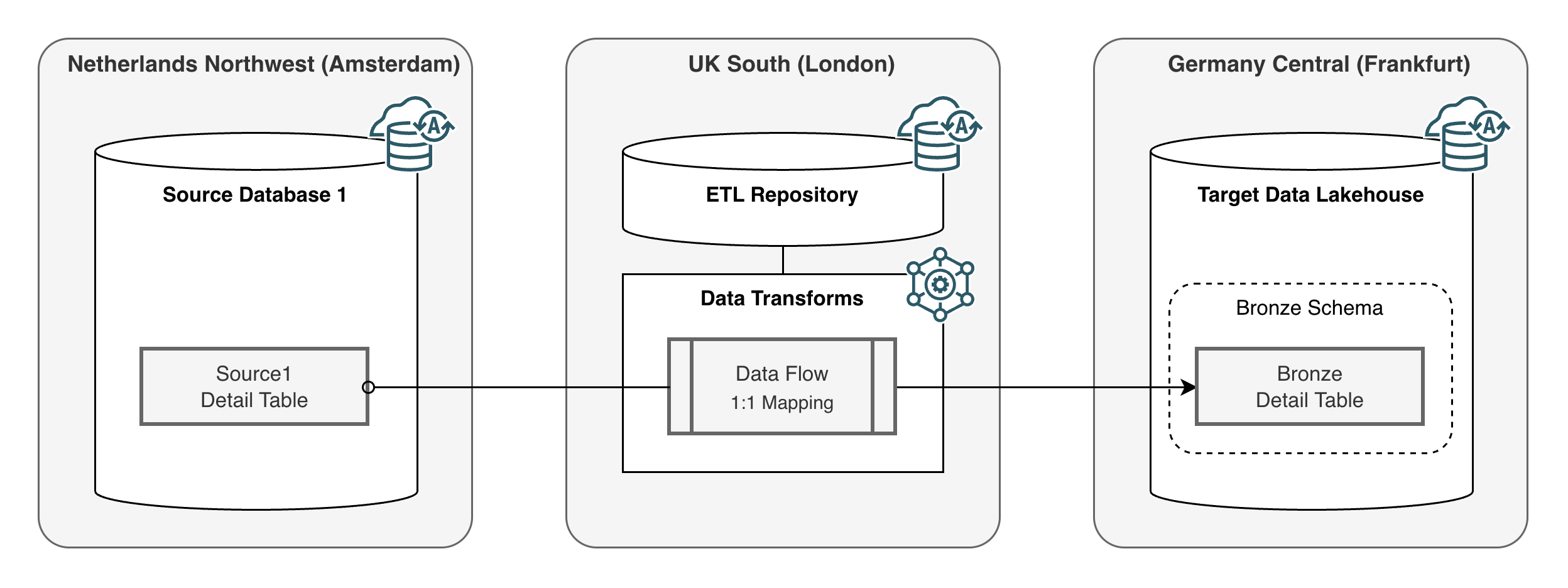
The 1st scenario tests simple transfer of data from the source table in the source database to the target table in the target database, without any transformation. A good example of this data flow is loading the bronze layer from the source.

The design is as simple as possible - 1:1 mapping, appending rows from the source table to
the target table. Both tables have the same structure. The Transfer indicator shows at
which point the data is transferred over the network.
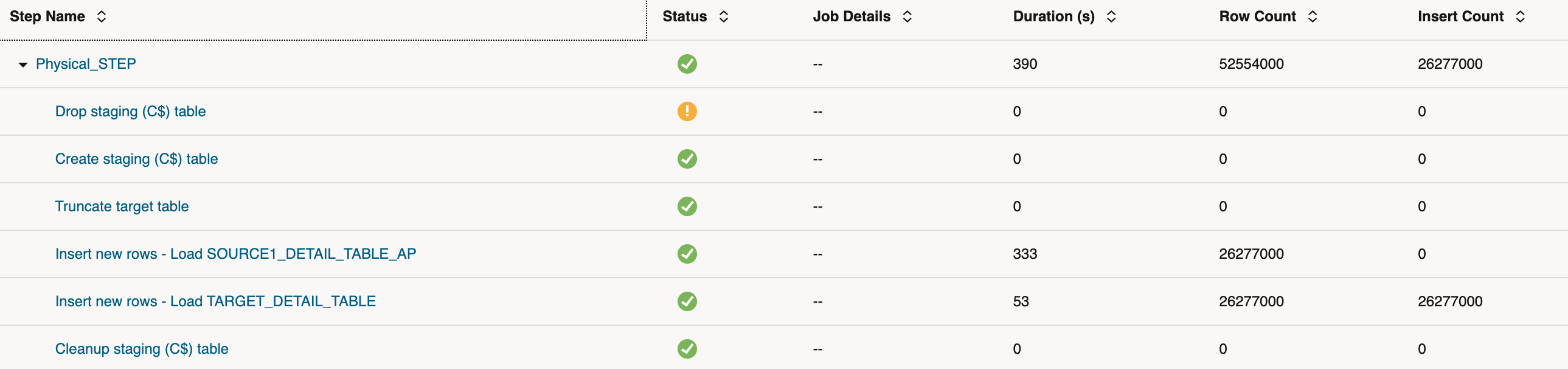
To transfer data between locations, Data Transforms agent runs a process that reads data from the source and it applies it to the target. In our scenario, with sources, target, and Data Transforms in different regions, it means 2 network hops - from Amsterdam to London, and from London to Frankfurt.
To optimize the network transfer and insert performance with Oracle Databases, Data Transforms uses Oracle Array Interface (part of Oracle Call Interface) that batches data and reduces network overhead. Note the array fetch size and batch commit size are defined automatically; users cannot change them.
The data transfer achieved throughput of about 36 MB/sec (or 79 thousands rows/sec). This is no benchmark, as the throughput is influenced by many factors - sizing of source and target databases and Data Transforms instance, and network capacity and latency. I strongly recommend testing the throughput on your configuration and topology.
The Data Flow utilizes staging tables to separate the network transfer from the update of the target tables. In case of a network problem during the transfer, the staging table can be safely recreated and the Data Flow restarted, without impacting the target.
2. Data Transformation on Target
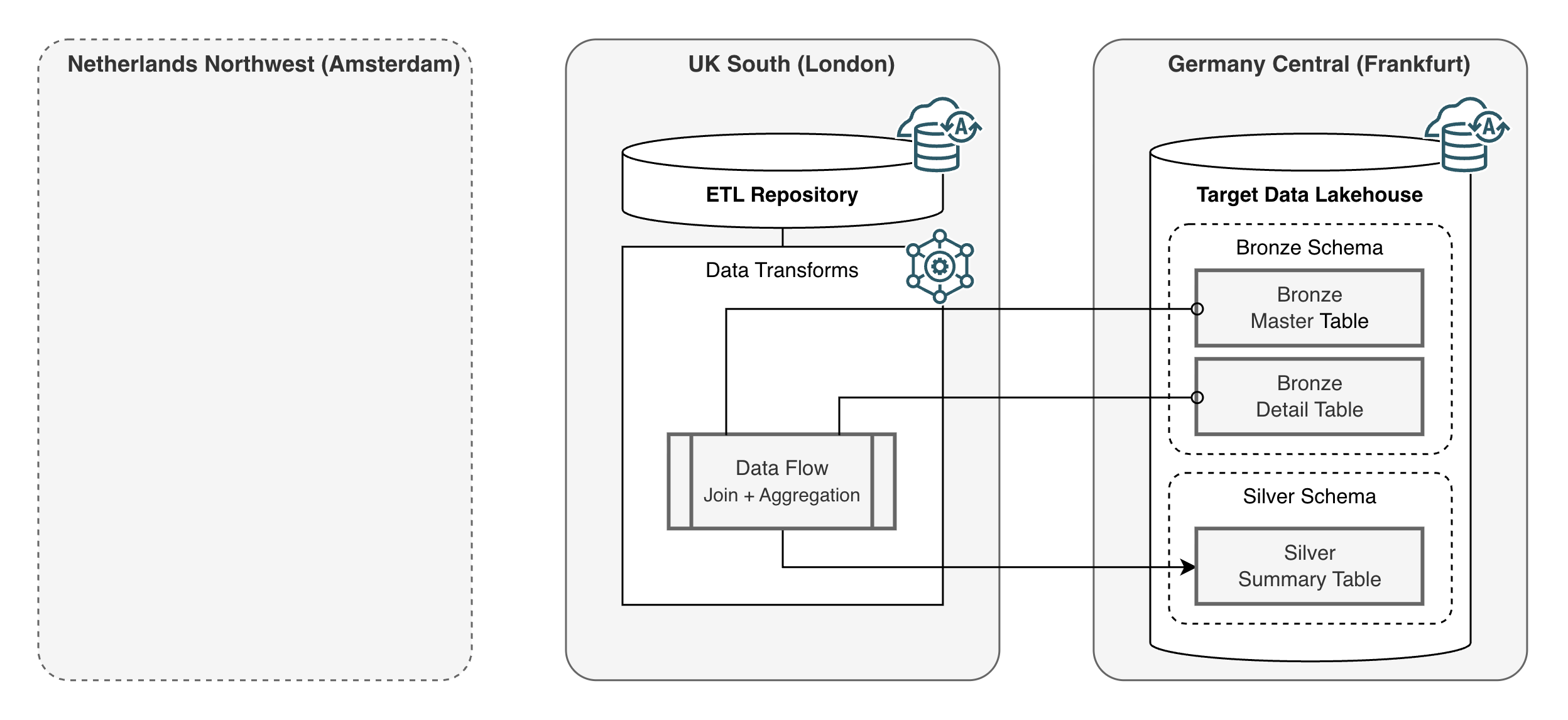
The 2nd scenario tests data transformation with both sources and targets in the same database. This kind of transformation typically happens in the layered architecture (e.g., Medallion architecture), where tables in the Silver layer are populated from the Bronze layer.
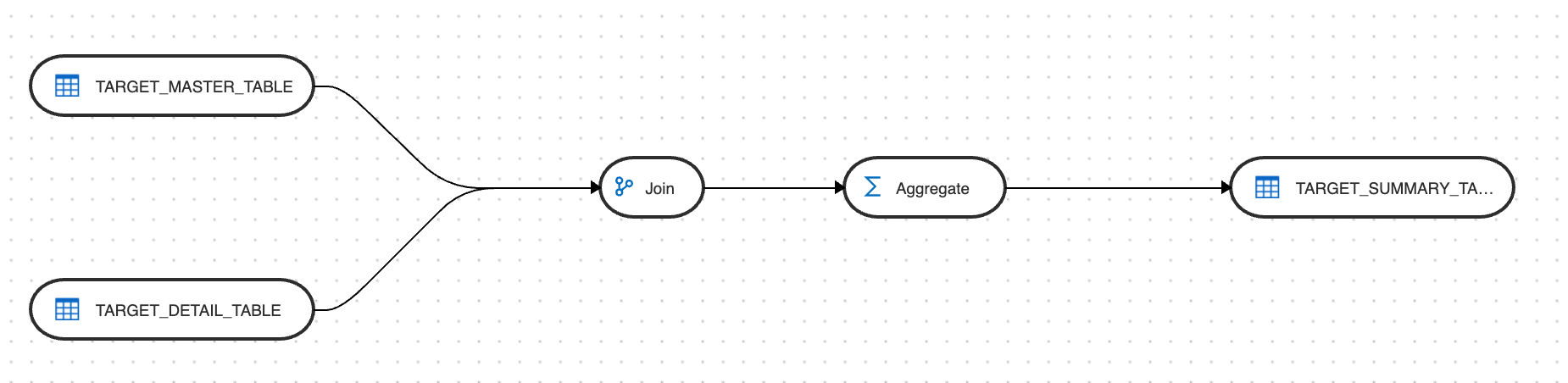
The Data Flow joins master and detail tables, aggregates the results, and inserts the outcome into the summary table. No network transfer is happening in this case, as both source and target tables are in the same database.

The whole transformation is implemented as a single INSERT SELECT statement, executed on
the target database. No staging table is used. Data Transforms generates and submits the
SQL statement; all the work is done by the target database.
3. Pushdown to Source
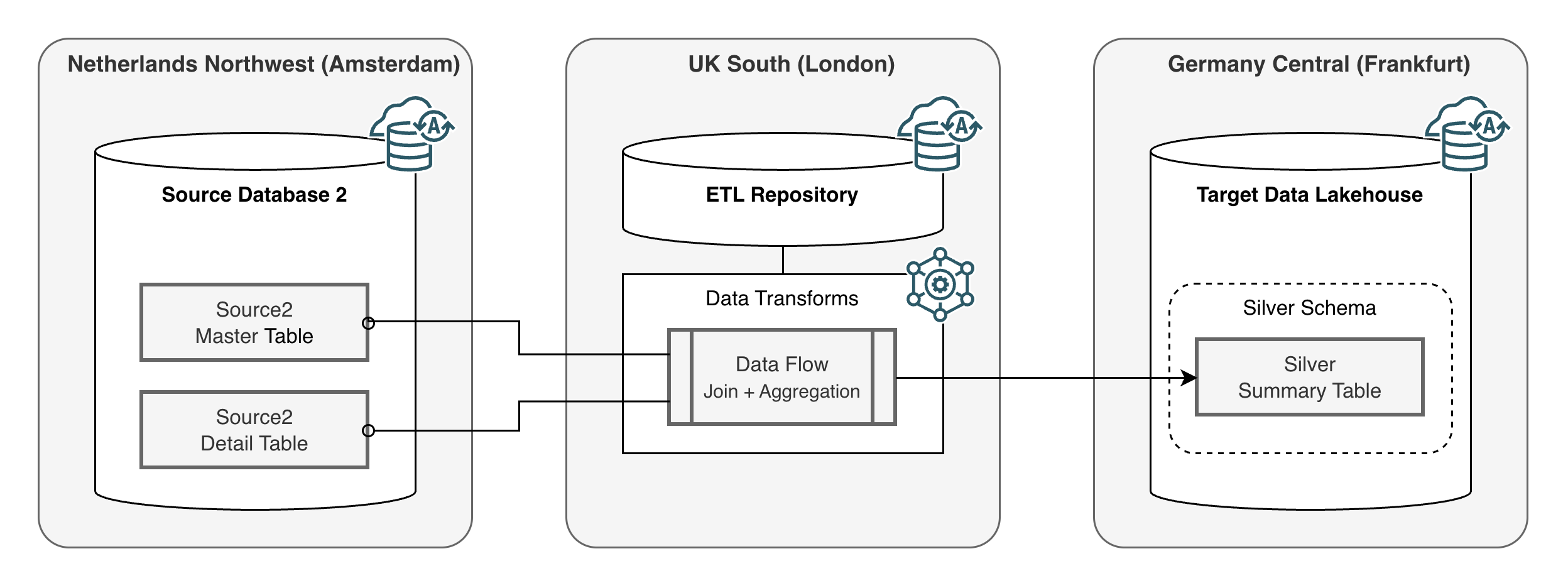
The 3rd scenario tests whether Data Transforms pushes down the query to the source database in case the query uses source tables only. This is a useful optimization in case the source query significantly reduces the size of data to be transferred.
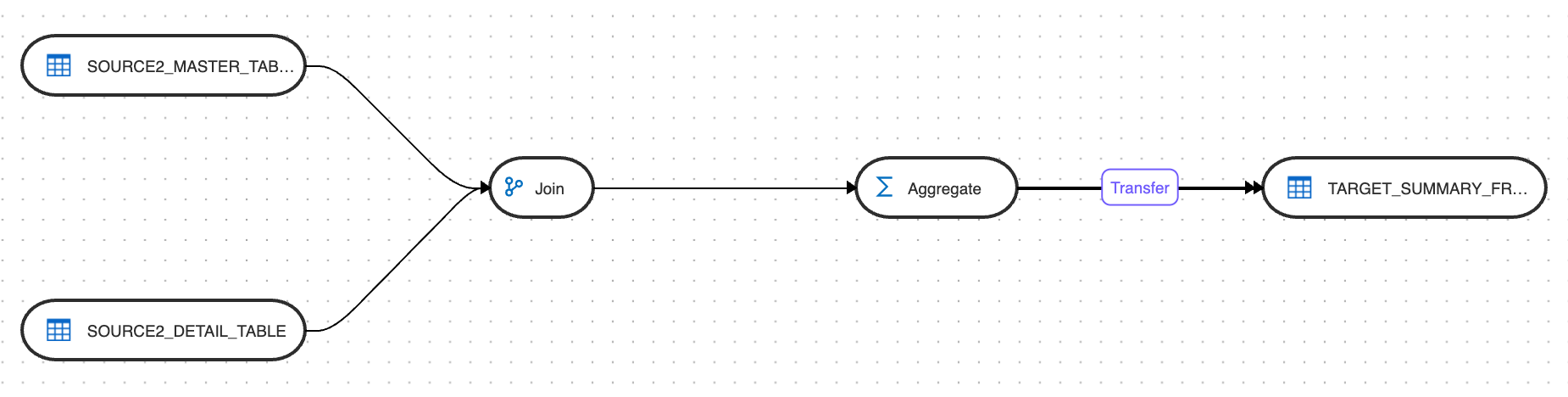
The data transformation has exactly the same logic as in the previous case. The difference is that both source tables reside in another database than the target table. You can see that Data Transforms executes the join and aggregation on the source database, and then it transfers and applies the final data set to the target.
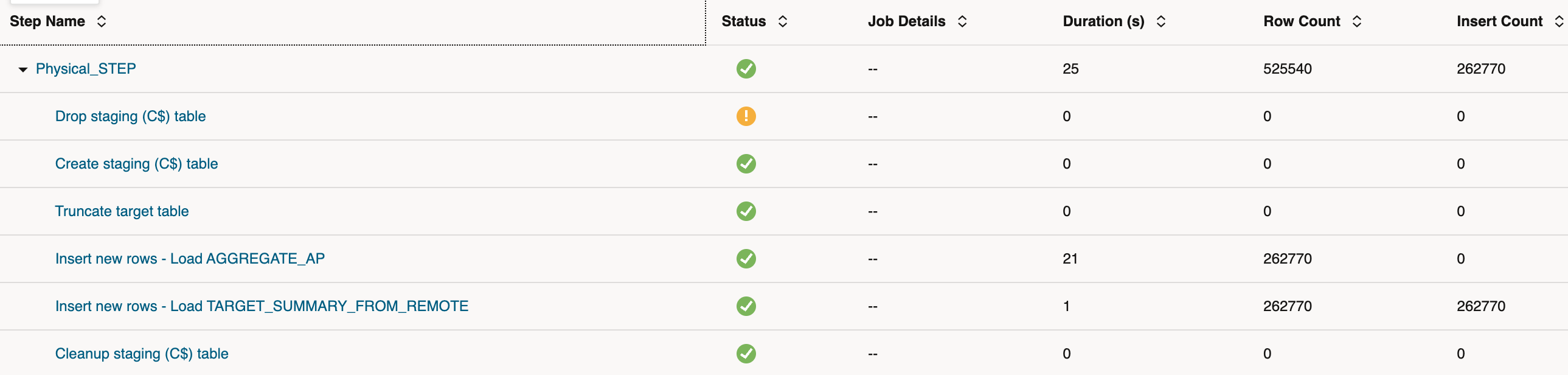
The Data Flow follows the same pattern as in the 1st scenario - it creates the staging table, it inserts data into the staging table over the network, and it loads the target table from the staging. The staging table is populated by the data transformation that happens on the source database.
The Data Flow is very fast, as only the results of the transformation, orders of magnitude smaller than the source data, are transferred over the network. Note the pushdown to source can happen only if the source technology supports the required operations.
4. Distributed Query
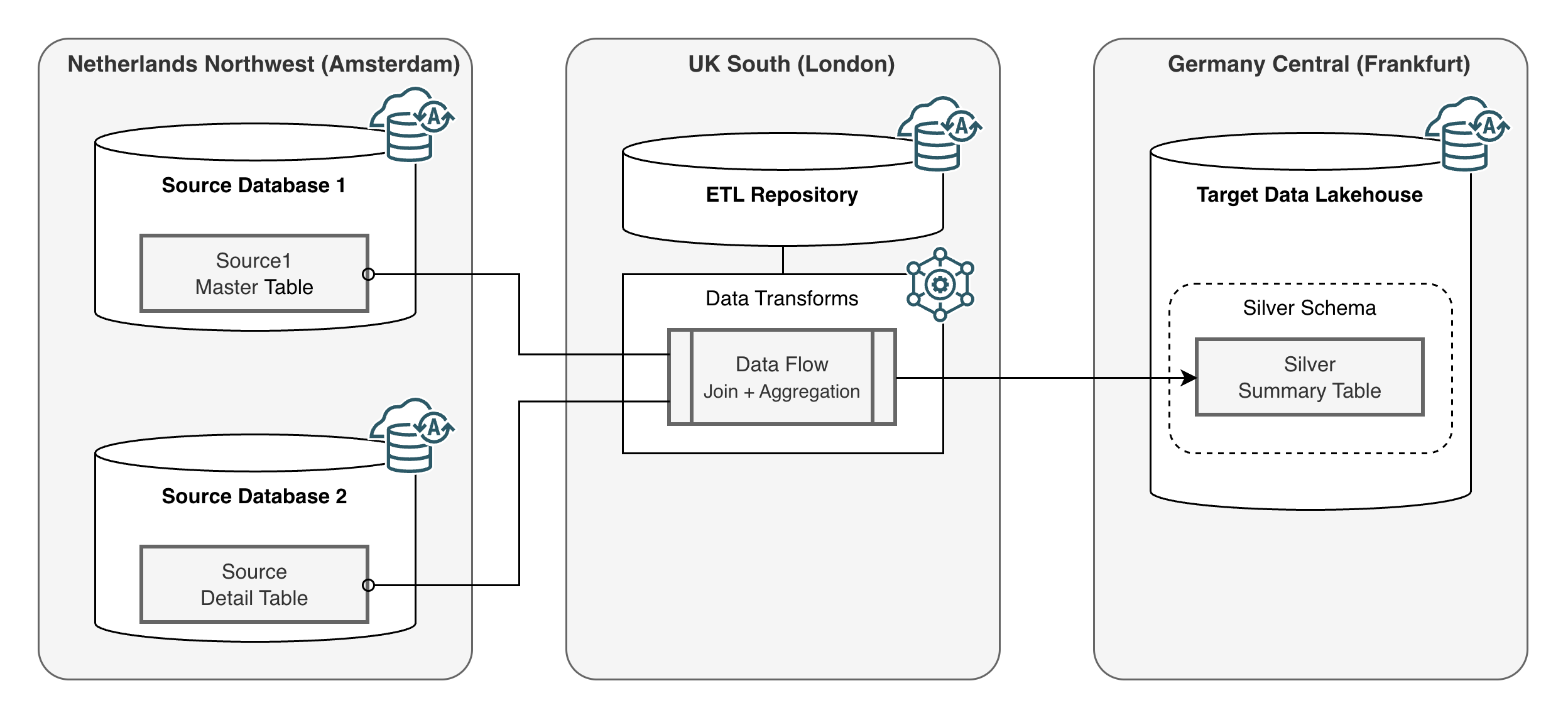
The 4th scenario explores how Data Transforms handles the case when the source query is distributed across multiple data sources and the source pushdown is not feasible.
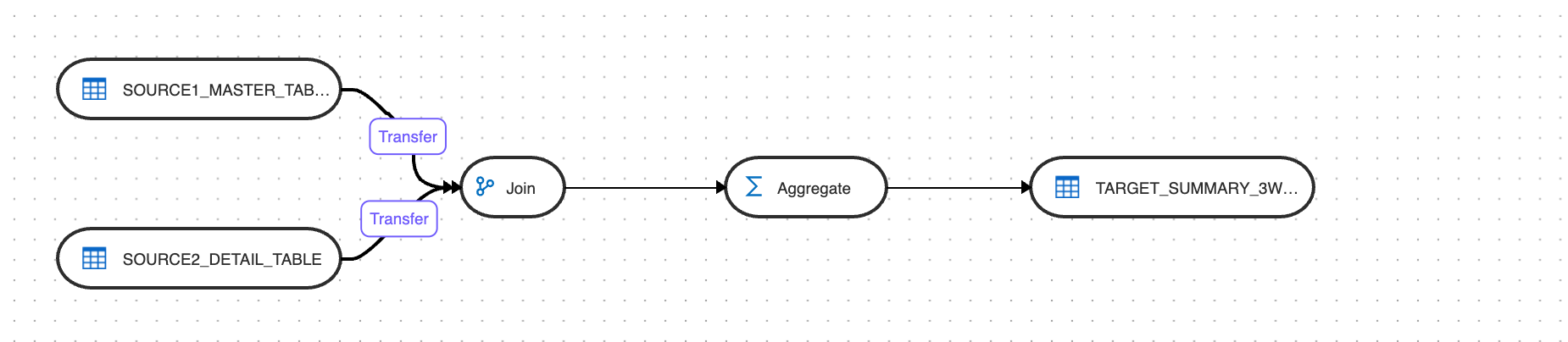
Again, the data transformation is logically the same as in the previous two scenarios. But, in this case, the source tables are in different databases and the transformation cannot happen in the source. Instead, Data Transforms transfers the content of source tables to the target database and it executes the transformation there.
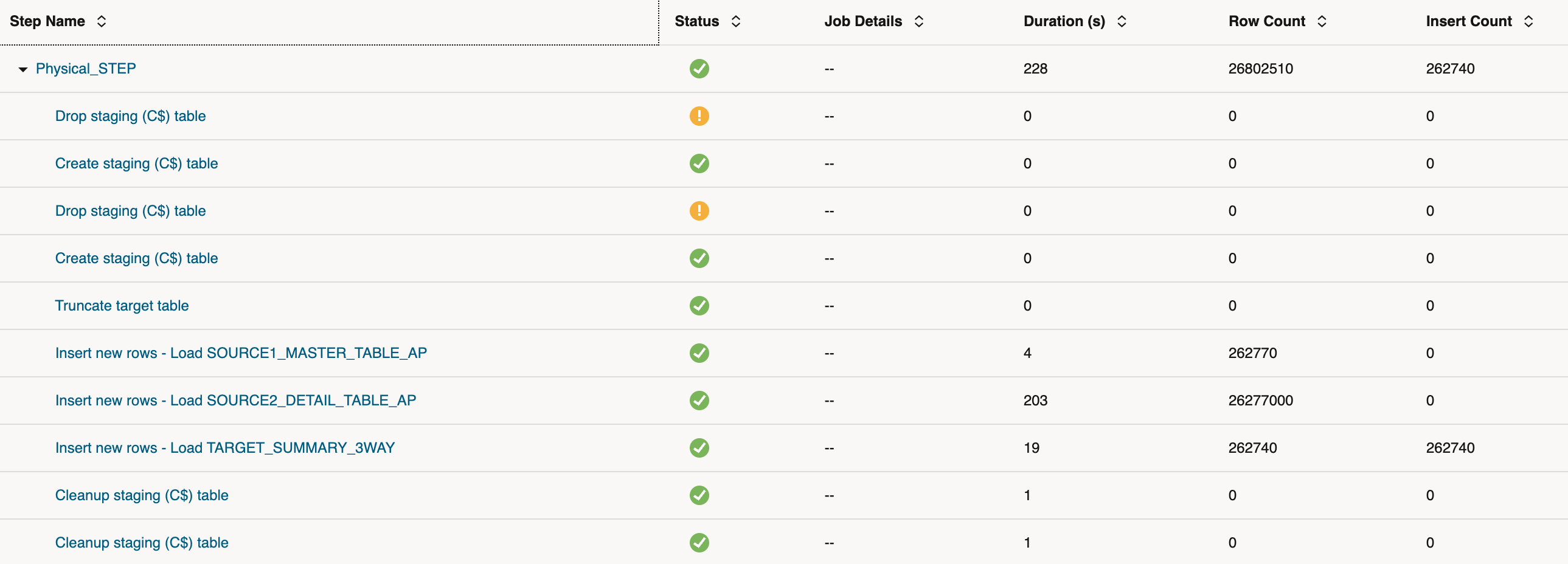
The Data Flow creates two staging tables in the target database, one for every source table. It transfers and loads source data to these staging tables and then it executes the transformation in the target database. There is no pushdown to source as the join is distributed.
You may wonder why the transfer of the SOURCE_DETAIL_TABLE took only 203 seconds, when the
same transfer in the 1st scenario needed 333 seconds. The reason is that in the 4th scenario
Data Transforms transfers only the columns required by the transformation, while the 1st
scenario must transfer all the columns in the table. In other words, Data Transforms
applies column projection to transfer only the required columns.
Test Summary
Data Transforms uses several methods that make Data Transforms suitable for data integration and processing in distributed environments. I believe these methods are the best practices that work really well in majority of cases.
-
Staging table(s) - Data Transforms utilizes staging tables to decouple the data transfer from the data processing. This enables the ELT model and set processing in Data Flows and it improves the reliability and restartability of the data integration tasks.
-
Oracle Array Interface - Data Transforms uses Array Interface (or its equivalent in case of non-Oracle data stores) to insert data transferred over the network to the staging table. Array Interface reduces network round trips and it lowers the execution and commit overhead, resulting in higher throughput.
-
Push data filtering to sources - Data Transforms pushes as much processing as possible to source databases, reducing the amount of data to be transferred. This includes column projection, where conditions, source joins, lookups, and aggregations.
-
Push processing to target - Processing of data from distributed sources happens on the target database, applying the data transformation on staging tables before loading the target table. A Data Flow follows the ELT principle - data is extracted, loaded to the target database, and transformed to the target shape.
-
No data transfer if sources and target are in the same database - In case all sources use the same connection as the target table, Data Transforms executes the transformation as a single SQL statement, without any data transfer. This is really useful for layered designs such as Medallion architecture.
Limitations
It is worth noticing that Data Transforms has some limitations that might be important for less standard distributed scenarios.
-
No control over the batch size - Developers cannot customize Array Interface batch size. They also cannot change the commit frequency. Both parameters are defined automatically.
-
No control over the agent placement - Data Transforms does not support multiple agents and control over the location of agents. Agents are always running where Data Transforms is deployed.
-
No parallel data transfer - Data transfer in a Data Flow is single threaded process, there is no support for having multiple parallel sessions to fully utilize the available throughput.
-
No choice of using alternative data transfer method - For some scenarios, it could be more efficient to export source data to files and transport files over the network. This is not possible currently.
Resources
- Data Transforms documentation: Using Oracle Data Transforms.